

Set your fleet oil-change schedule by using OEM manufacturer intervals as the baseline, then trigger service on a first-to-occur basis — whichever comes first among miles, engine hours, or calendar time — and refine those intervals over time with oil analysis and telematics data.
Quick TLDR:
- Assign PM tiers by vehicle class and duty cycle before anything else
- Set first-to-occur triggers (miles, engine hours, and calendar time running simultaneously)
- Automate reminders and work orders through fleet maintenance software
- Start an oil-analysis pilot on your highest-mileage units to validate extension opportunities
- Build a DOT inspection buffer by scheduling annual compliance tasks at 11 months
Example (Class 8 line-haul baseline): an OEM-recommended mileage or time interval, whichever comes first. Under severe-duty conditions such as high idle, stop-and-go, or extreme temperatures, use a shorter interval. The first threshold reached triggers the service — not the last.
Express Lube & Car Care’s ASE-certified technicians work with fleet accounts in the Plano and Collin County area, providing same-day oil changes with documented service history that supports exactly this kind of structured PM program.
Table of Contents
- Why a formal oil-change schedule protects your fleet’s uptime
- Which service trigger is right for each vehicle in your fleet?
- What baseline intervals should you use, and what do sample templates look like?
- How do you actually set up a fleet oil-change schedule from scratch?
- How do oil analysis and telematics help you optimize drain intervals?
- Which tools automate scheduling, trigger work orders, and store service history?
- How do you run oil changes with minimal downtime across a large fleet?
- Your 30/60/90-day implementation checklist and sample service calendar
- Key Takeaways
- What fleet managers often get wrong about oil-change scheduling
- Fleet oil-change support for Plano and Collin County fleets
- Useful sources for deeper reading
- FAQ
Why a formal oil-change schedule protects your fleet’s uptime
Unplanned engine failures cost far more than the oil change that would have prevented them. A structured preventive maintenance plan keeps vehicles in service on your terms, not the engine’s. Scheduled shop time means you control when a truck is off the road; a breakdown means the road controls you.
Following OEM-based intervals also protects your warranty position. Manufacturers publish specific drain intervals by engine family and duty cycle, and deviating from them without documented oil-analysis validation gives warranty administrators grounds to deny claims. That is a financial exposure most fleets cannot afford.
DOT compliance adds another layer of urgency. Scheduling annual inspections at 11 months rather than at the 12-month mark gives your shop a 30-day runway to repair any deficiency before the compliance window closes. Pairing that buffer with your oil-change calendar means fewer scheduling conflicts and cleaner audit trails.
Pro Tip: Start your schedule by vehicle class and the components most likely to fail first. Heavy-duty vocational units with high idle time should be your first priority — they accumulate wear faster than their odometers suggest.
Which service trigger is right for each vehicle in your fleet?

The answer is almost always “all three, first-to-occur.” Mileage alone misses wear on high-idle vehicles; calendar time alone misses wear on high-utilization units. Running miles, engine hours, and time concurrently and triggering on whichever threshold hits first captures the full range of duty cycles in a mixed fleet.
That said, each trigger has a natural home:
- Mileage fits long-haul trucks that accumulate miles steadily with low idle time
- Engine hours fit vocational units (cranes, refuse trucks, utility vehicles) that run engines at idle for extended periods without moving
- Calendar time fits seasonal or low-mileage units that sit for weeks between uses — oil degrades chemically even when a vehicle is parked
- Fuel used fits specialty fleets with precise fuel-consumption records and variable duty cycles
The critical threshold: if a vehicle runs more than 25–30% idle time, odometer-only scheduling undercounts wear. Industry guidance treats roughly 1 engine hour as equivalent to 25–40 miles of wear depending on load conditions. A utility truck idling four hours a day accumulates the equivalent of 100–160 miles of engine wear that never shows on the odometer.
Pro Tip: Pull a 90-day idle-percentage report from your telematics system before assigning triggers. Any unit above 25% idle should move to hour-based or hybrid scheduling immediately.
Data sources to feed your triggers:
- Odometer readings (driver logs, GPS, telematics)
- ECM engine-hour counters (direct from the vehicle or via telematics gateway)
- Fuel card transaction data (gallons consumed per unit)
- Telematics platform reports (idle %, trip distance, fault codes)
- Manual driver inspection sheets (backup for units without telematics)
What baseline intervals should you use, and what do sample templates look like?
Start with OEM-published drain intervals for your specific engine families. Heavy-duty OEM intervals vary widely depending on engine design, oil specification, and application — this variability means guessing intervals can be risky. Never exceed the OEM ceiling without oil-analysis data confirming the oil is still within specification.
A practical starting point for most fleets, before you have enough oil-analysis data to customize:
| Vehicle Class | Baseline Miles | Engine Hours | Calendar Time | Severity Adjustment |
|---|---|---|---|---|
| Light-duty (vans, pickups) | a few thousand miles | a few hundred hours | a few months | Shorten interval for severe duty |
| Medium-duty (box trucks, step vans) | moderate miles | moderate hours | approximately three months | Shorten interval for high-idle routes |
| Heavy-duty line-haul | higher mileage baseline | higher engine hours | about a year | Consider extension only with oil analysis |
| Heavy-duty vocational | moderate mileage | moderate hours | about half a year | Prefer hour-based scheduling |
These ranges align with published PM cadences used as starting points in precision maintenance programs: 90 days or 25,000 miles for heavy-duty, 90 days or 12,500 miles for medium-duty, adjusted by oil type and operating data.
Sample three-tier schedule template:
- Tier 1 (Commuter/Light): 5,000 miles OR 3 months OR a few hundred engine hours, whichever comes first. Full synthetic extends to 7,500 miles with oil-analysis confirmation.
- Tier 2 (Regional/Medium): 12,500 miles OR 90 days OR 300 engine hours, first-to-occur. Severe-duty routes shorten to 7,500 miles or 60 days.
- Tier 3 (Heavy-Duty Line-Haul): 25,000 miles OR 12 months OR 500 engine hours, first-to-occur. Extension to 30,000+ miles requires oil-analysis validation and OEM sign-off.
Always cross-reference the oil viscosity grade and filter specification in the OEM manual before finalizing intervals. A mismatch between oil spec and interval length is one of the most common causes of premature engine wear in fleets that switch lubricant suppliers.
How do you actually set up a fleet oil-change schedule from scratch?
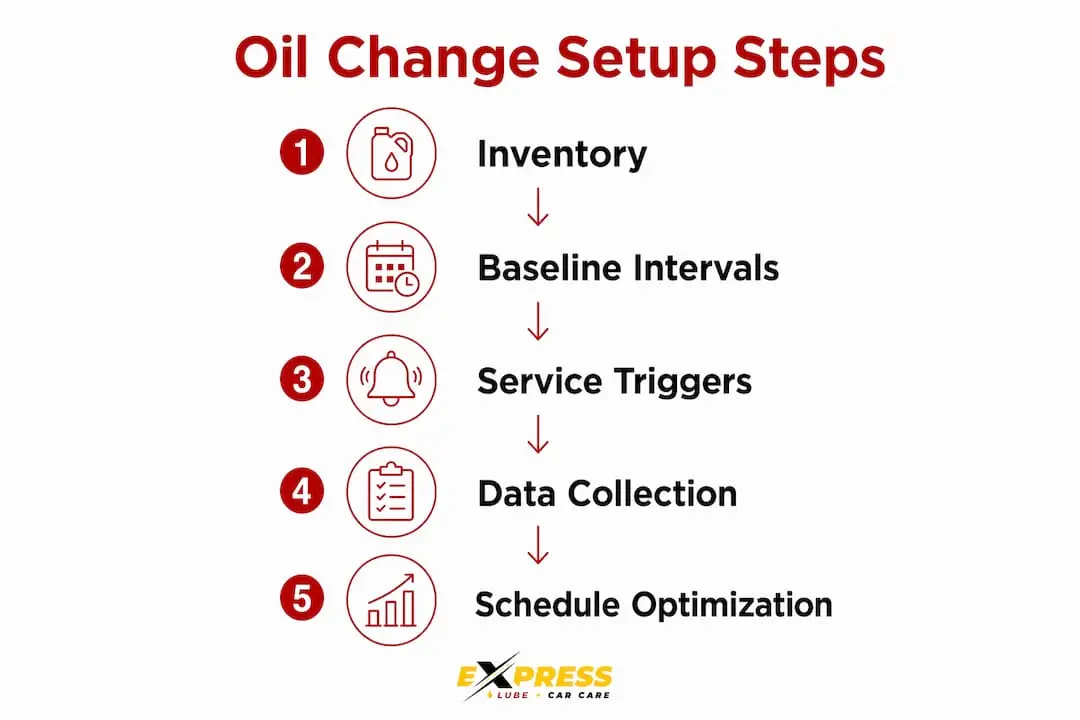
The setup process has five steps. Work through them in order — skipping the inventory phase is the single most common reason fleet PM programs fail within the first year.
-
Fleet inventory and data gathering. Collect VIN, engine make/model/year, oil capacity, OEM-specified oil grade, current odometer, engine hours, idle percentage, and duty-cycle classification for every unit. This data becomes the foundation of every trigger and tier decision downstream.
-
Assign PM tiers. Group vehicles by class and duty cycle using the baseline table above. Resist the urge to create too many tiers early — three tiers (light, medium, heavy) are manageable; eight tiers are not. You can split tiers later once you have oil-analysis data to justify it.
-
Define triggers and scheduling windows. Set first-to-occur thresholds for each tier. Then apply a 10% scheduling window around the mileage trigger to stagger appointments. For a 25,000-mile interval, that window opens at 22,500 miles and closes at 25,000 miles. The window is a planning tool, not permission to run past the trigger.
-
Configure software and automate reminders. Enter every unit into your fleet maintenance platform with its tier, triggers, and current readings. Set automated work-order generation at the window-open threshold and a second alert at the hard trigger. Verify that the system accepts engine-hour inputs, not just odometer data.
-
Train staff and drivers. Dispatchers need to understand scheduling windows. Drivers need to know how to report odometer and engine-hour readings accurately. Shop foremen need to know the PM tier for each unit before it rolls into the bay.
30/60/90-day rollout timeline:
- Days 0–30: Complete fleet inventory, assign tiers, enter baseline data into software, identify your pilot group (10–15 units across all tiers)
- Days 31–60: Run pilot group through first scheduled services, collect oil-analysis samples, validate trigger accuracy against telematics data, train dispatchers and drivers
- Days 61–90: Full fleet rollout, activate automated reminders and work orders, schedule first DOT inspection buffer dates, document service history baseline
Customizing PM schedules by vehicle and application yields real cost savings, but it requires disciplined data collection. Start with fleet-wide standard intervals and move toward vehicle-by-vehicle management as your data matures.

How do oil analysis and telematics help you optimize drain intervals?
Fixed intervals are a starting point. Condition-based scheduling is the destination. Oil analysis is the definitive method for validating whether a drain interval is safe to extend or needs to be shortened — it provides objective, engine-specific data that no telematics system alone can replicate.
A standard oil-analysis report covers viscosity, total base number (TBN), oxidation, nitration, soot content, and wear-metal particle counts (iron, copper, aluminum, lead). When viscosity holds within grade, TBN remains above the condemnation limit, and wear metals stay below threshold, the data supports extending the interval. When soot climbs above 3–4% or iron particles spike, the engine is telling you to shorten it.
Telematics fills in the operational context. Engine-hour data, idle percentage, fuel economy trends, and fault code history all validate or challenge what the oil sample shows. A unit with rising iron wear metals and a recent spike in idle percentage has a clear story: the idle time is accelerating wear, and the interval needs to shorten.
Pro Tip: Sample oil at every drain for the first six months of a new PM program. Once you have three consecutive clean samples at a given interval, you have the data to justify an extension conversation with your OEM or lubricant supplier.
Before extending any interval beyond the OEM ceiling, engage your engine manufacturer’s technical representative. Extending without that sign-off risks voiding the powertrain warranty — a cost that dwarfs any savings from fewer oil changes. Annual review of PM intervals against failure logs and operating data is standard practice in well-run fleets, not an optional extra.
Which tools automate scheduling, trigger work orders, and store service history?
The right fleet maintenance platform eliminates manual tracking and creates an audit-ready service record for every unit. Prioritize systems that support first-to-occur triggers across miles, engine hours, and calendar time simultaneously — a platform that only tracks odometer readings will fail your vocational units.
Capabilities to evaluate when selecting a platform:
- Engine-hour ingestion directly from ECM or telematics gateway
- Multiple concurrent trigger types per asset (miles + hours + time)
- Automated work-order generation at configurable thresholds
- Oil-life monitoring and condition-flag fields
- Maintenance calendar with shop capacity planning
- Driver-facing reminder notifications (app or SMS)
- Reporting on overdue services, upcoming services, and cost per unit
- API integration with telematics platforms and fuel-card systems
Three tool categories to consider:
Fleet maintenance platforms like Fleetio and Autosist handle scheduling, work orders, and service history in a single interface. Fleetio supports telematics integrations and multi-trigger scheduling natively. Autosist targets smaller fleets with a simpler interface and lower entry cost. eFleets focuses on compliance documentation and inspection records alongside PM scheduling, making it a strong fit for fleets with heavy DOT audit exposure.
For telematics data ingestion, your ECM gateway (whether from your GPS provider or a standalone device) feeds real-time engine hours and fault codes into the maintenance platform. Verify that the data handshake between your telematics provider and your maintenance software is bidirectional — one-way feeds create data lag that defeats the purpose of condition-based scheduling.
Integration checklist before going live:
- Map VIN, engine hours, and odometer fields between telematics and maintenance platform
- Test trigger firing on a single unit before fleet-wide activation
- Confirm automated work orders route to the correct shop or dispatcher queue
- Validate that reminder notifications reach drivers at the correct threshold
- Run a 30-day parallel test (manual vs. automated) to catch discrepancies
How do you run oil changes with minimal downtime across a large fleet?
The goal is never zero shop time — it is planned shop time. Staggering services, using scheduling windows, and building DOT buffers converts reactive maintenance into a predictable operational rhythm.
Tactics that reduce shop congestion and vehicle downtime:
- Use the 10% mileage window to spread appointments across the week rather than clustering them when a group of vehicles hits the trigger simultaneously
- Set a daily shop capacity limit (expressed as a percentage of fleet size) to prevent bottlenecks — most shop managers find that servicing more than 15–20% of a fleet in a single day creates quality and throughput problems
- Schedule heavy-duty PM groups by vehicle number suffix or route assignment to naturally stagger due dates
- For fleets with vehicles that cannot easily come off the road, mobile lube vans bring the service to the vehicle during off-peak hours
- Pair oil changes with other short-duration services (filter replacements, fluid top-offs, visual inspections) to maximize each shop visit
Scheduling DOT inspections at 11 months rather than at the 12-month mark gives you a 30-day repair window before the compliance deadline. Align that buffer date with the nearest oil-change service to reduce the number of separate shop visits per unit per year.
Pro Tip: Estimate your shop’s daily throughput before setting capacity limits. If an oil change on a Class 8 truck takes 45 minutes and you have two bays and a four-hour service window, your realistic daily capacity is eight trucks. Build your scheduling calendar around that number, not an optimistic one.
Your 30/60/90-day implementation checklist and sample service calendar
A phased rollout reduces risk and delivers early wins that build organizational confidence in the program. The first 30 days are about data; the second 30 are about validation; the third 30 are about scale.
Phase 1: Days 0–30 (Foundation)
- Complete fleet inventory: VIN, engine model, oil spec, current odometer, engine hours, idle %, duty cycle for every unit
- Assign all units to PM tiers (light, medium, heavy)
- Enter baseline data into fleet maintenance software
- Select pilot group: 10–15 units representing all three tiers
- Set first-to-occur triggers and scheduling windows for pilot units
- Schedule first oil-analysis samples for pilot units
Phase 2: Days 31–60 (Validation)
- Complete first PM cycle on all pilot units
- Review oil-analysis results against baseline intervals
- Validate telematics trigger accuracy (compare software alerts to actual odometer/hour readings)
- Train dispatchers on scheduling windows and work-order workflows
- Train drivers on odometer and engine-hour reporting procedures
- Adjust tier assignments if pilot data reveals misclassified units
Phase 3: Days 61–90 (Full Rollout)
- Activate triggers and automated reminders for full fleet
- Set DOT inspection buffer dates (11-month scheduling) for all applicable units
- Establish monthly service calendar with staggered PM groups
- Document service history baseline for every unit
- Schedule 90-day program review with shop foreman and fleet manager
- Assign annual interval review to fleet manager (calendar reminder)
Sample 90-day service calendar structure:
- Week 1–2: Pilot group PM services + oil-analysis sampling
- Week 3–4: Pilot data review, software configuration adjustments
- Month 2: Tier 1 (light-duty) full rollout, first automated work orders generated
- Month 2–3: Tier 2 (medium-duty) rollout, DOT buffer dates entered
- Month 3: Tier 3 (heavy-duty) rollout, first program audit, annual review scheduled
Ownership is straightforward: the fleet manager owns tier assignments and interval decisions; the dispatcher owns scheduling windows and shop capacity; the shop foreman owns service execution and documentation.
Key Takeaways
A fleet oil-change schedule built on OEM baselines, first-to-occur triggers, and oil-analysis validation is the most reliable path to lower downtime and controlled maintenance costs.
| Point | Details |
|---|---|
| OEM intervals are the baseline | Never exceed manufacturer-published drain intervals without oil-analysis data and OEM sign-off. |
| First-to-occur triggers capture all duty cycles | Run miles, engine hours, and calendar time simultaneously; service on whichever threshold hits first. |
| Oil analysis validates extensions | Particle counts, viscosity, and TBN data are the only objective basis for safely extending drain intervals. |
| 10% scheduling window prevents shop surges | Open the service window at 90% of the mileage trigger to stagger appointments without delaying service. |
| Express Lube & Car Care supports fleet accounts | Same-day oil changes, documented service history, and a 24-month/24,000-mile warranty make Express Lube & Car Care a practical PM partner for Plano-area fleets. |
What fleet managers often get wrong about oil-change scheduling
The most common mistake is treating the OEM interval as a fixed rule rather than a starting point. Manufacturers publish those numbers based on standardized test conditions — your fleet’s actual duty cycle, fuel quality, ambient temperature range, and idle patterns will almost always push the real wear rate above or below that baseline. The interval is a ceiling without data; with oil-analysis data, it becomes a floor you can sometimes move.
The second mistake is building a schedule around the software rather than the vehicles. A platform that only accepts odometer inputs will produce a technically “scheduled” program that systematically undercounts wear on your vocational units. The tool should serve the trigger logic, not constrain it.
Data gaps are the silent killer of new PM programs. Fleets that skip the inventory phase and enter incomplete data into their maintenance platform end up with automated reminders firing on wrong thresholds, which erodes dispatcher trust in the system within weeks. A clean 30-day data-collection phase is not overhead — it is the entire foundation.
Small pilots deliver the fastest return. Running 10–15 units through a full PM cycle with oil-analysis sampling before fleet-wide rollout gives you real interval data, catches software configuration errors, and builds the internal credibility to sustain the program long-term.
Fleet oil-change support for Plano and Collin County fleets
Running a structured PM program means nothing if the service execution falls short. Express Lube & Car Care provides same-day fleet oil changes with no appointment required, performed by ASE-certified technicians who document every service with digital vehicle inspections, technician notes, and photos. Every job is backed by a 24-month/24,000-mile warranty, giving fleet managers a documented service record that holds up under DOT audit scrutiny.
Fleet accounts receive bulk scheduling support and access to service specials that reduce per-unit oil-change costs across larger vehicle groups. If an oil change surfaces a brake or engine concern, the same facility handles brake repairs and engine diagnostics on-site, so your vehicle does not need a second trip to a separate shop. For Plano-area fleets ready to put a formal PM program in place, contact Express Lube & Car Care to set up a fleet account or schedule your first batch of services.
Useful sources for deeper reading
- OEM Drain Intervals Guide (Chevron/Delo): Covers manufacturer-published drain interval ranges by engine family and duty cycle; use this to cross-reference your specific engine models before setting baseline intervals.
- Machinery Lubrication: Fleet Drain Interval Optimization: The most thorough publicly available primer on oil analysis methodology and how to use sample data to safely extend or shorten drain intervals.
- Commercial Carrier Journal: Determining Maintenance Intervals: Practical guidance on the tradeoffs between fleet-wide standard intervals and vehicle-by-vehicle customization, with real operator perspectives.
- Torque by Ryder: Fleet Vehicle Inspection Intervals: Explains DOT inspection timing by vehicle type and the 11-month scheduling practice for building compliance buffers.
- FleetOpsClub: How to Build a Fleet Maintenance Program: Covers idle-time impact on wear rates and the case for hour-based scheduling on vocational units.
- Truck News: Precision Maintenance: Discusses how top fleets use data-driven PM to protect warranty claims and reduce total cost of ownership.
- AutoROIQ: Automotive analytics and intelligence resource useful for benchmarking PM program performance and validating interval decisions with industry data.
- Express Lube & Car Care: Why Fleet Oil Changes Reduce Downtime: Covers the operational and financial case for timely oil changes in fleet applications.
- Express Lube & Car Care: Oil Change Frequency for Deployments: Relevant for fleets with vehicles in high-demand or severe-duty deployment cycles.
Always consult your OEM’s owner manual and engine-specific maintenance guide before modifying any baseline interval. Published third-party guides, including this one, are starting frameworks — the manufacturer’s documentation for your specific engine is the authoritative source.
FAQ
How do you set up a fleet maintenance program?
Start with a complete fleet inventory (VIN, engine model, OEM intervals, current mileage, and engine hours), assign vehicles to PM tiers by class and duty cycle, set first-to-occur service triggers, configure automated reminders in a fleet maintenance platform, and run a pilot group through the first PM cycle before full rollout.
What is the 30/60/90 maintenance schedule?
The 30/60/90 framework is a phased rollout plan: the first 30 days cover data collection and pilot setup, days 31–60 cover pilot validation and staff training, and days 61–90 cover full fleet activation and the first program audit.
How often should fleet vehicles be serviced for oil changes?
Service intervals depend on vehicle class and duty cycle. Light-duty units typically follow a 5,000-mile or 3-month interval; medium-duty units run 12,500 miles or 90 days; heavy-duty line-haul trucks start at 25,000 miles or 12 months. Always use OEM-published intervals as the baseline and trigger service on whichever threshold is reached first.
What is the 30/60/90 rule for cars?
In a general vehicle maintenance context, the 30/60/90 rule refers to major service checkpoints at 30,000 miles and beyond where filters, fluids, belts, and other wear items are inspected or replaced according to OEM schedules. For fleet oil-change scheduling, the same milestone logic applies but is layered on top of more frequent drain intervals.
When should a fleet use engine hours instead of mileage to trigger oil changes?
Use engine-hour triggers when a vehicle runs more than 25–30% idle time, since idling accumulates engine wear without adding odometer miles. Vocational units such as utility trucks, refuse vehicles, and construction equipment are the clearest candidates; industry guidance treats roughly 1 engine hour as equivalent to 25–40 miles of wear depending on load conditions.